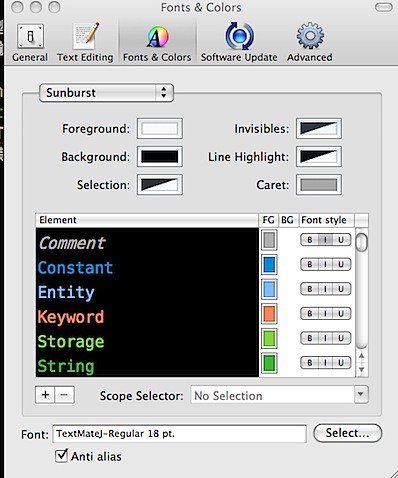
簡單地將剛剛安裝 PIMMS 指令的過程記錄一下。
******************************
PIMMS 在 HEASARC 的官方介紹網頁:
http://heasarc.gsfc.nasa.gov/docs/software/tools/pimms.html
非常簡易的使用者導引:
ftp://legacy.gsfc.nasa.gov/software/tools/pimms.pdf
原始碼下載網址:
ftp://legacy.gsfc.nasa.gov/software/tools/pimms4_7d.tar.gz
安裝說明頁面:
http://heasarc.gsfc.nasa.gov/docs/software/tools/pimms_install.html
******************************
節錄安裝說明網頁的部分敘述:
% make arch=solaris
The makefile allows for linux, darwin (Mac OS X), solaris, alpha, sun (for pre-Solaris SunOS), and dec (Ultrix), although recent versions have not been tested on many of the legacy systems.~
但剛剛測試時發現在10.10.4 (Yosemite) 之下,
得使用 make arch=osx 才會開始編譯動作。
另外因我是用 MacPorts 來安裝額外的命令程式,
MacPorts 針對優勝美地目前沒有 gfortran,
所以有新增 FC = g77 在 Makefile 中。
編譯過程有一個警告訊息,
是針對 osx 最低版本的設定,
所以不理會XD
目前 PIMMS 指令模式執行後看起來正常,
希望等等開始進行測試時不會出現問題呀!
[備註01]
HPC 提供了給優勝美地用的 gfortran5.1:
http://nchc.dl.sourceforge.net/project/hpc/hpc/g95/gfortran-5.1-bin.tar.gz
等等在 Crab#3 安裝 PIMMS 就直接來用這 gfortran 編譯吧!
[備註02]
順便記錄一下在 MacPorts 發現了:
*g95 @0.93_4 (lang) : Another GNU Fortran 95 compiler
*wcstools @3.8.7_1 (science) : Programs for manipulating world coordinate systems (WCSs) in FITS images
等等新套件~等等也順便將 wcstools 裝到 Crab#3 上面!
然後 Bandy 似乎需要 gsl 套件來跑她的 codes~
*gsl @1.16_3 (math, science) : A numerical library for C and C++ programmers
等等也順手裝上...
2015/08/06


2014/08/27
Some notes for OSX Server 3.0 & Mavericks
以下都是怕自己之後忘記的備份:
針對「Setup Mail Aliases 4 OSX Server 3」
1> cd /etc
2> sudo mv aliases aliases.origin (註:有可能會沒有此檔)
3> sudo ln -s /Library/Server/Mail/Config/postfix/aliases aliases
4> sudo mv aliases.db aliases.db.origin (註:有可能會沒有此檔)
5> sudo ln -s /Library/Server/Mail/Config/postfix/aliases.db aliases.db
6> sudo postalias aliases
7> sudo postfix reload
PS1: 其實我也順便處理了 /etc/postfix/ 裡面的 aliases & aliases.db
PS2: 文件裡面提到的 newaliases 指令似乎沒啥用XD
PS3: http://topicdesk.com/downloads/roundcube 很漂亮的 webmail 外掛!
順便再筆記一下兩個需要uncomment的網頁伺服器設定:
# Server-specific modules 找 LoadModule apple_userdir_module...
# User home directories 找 Include /private/etc/apache2/extra/httpd-userdir.conf...
之後再對 /etc/apache2/users 每個 user 更改其內容為:
Options -Indexes MultiViews FollowSymLinks
AllowOverride All
Order allow,deny
Allow from all
有需要開啟個人網頁之使用者需自行建立 Sites 資料夾~!
關於 sshd 的 X11 forward 設定:
1> sudo vi /etc/sshd_config
2> add "X11Forwarding yes" & "X11UseLocalhost no"
3> sudo launchctl stop com.openssh.sshd -> restart service...
其他想到再來補充~!
針對「Setup Mail Aliases 4 OSX Server 3」
1> cd /etc
2> sudo mv aliases aliases.origin (註:有可能會沒有此檔)
3> sudo ln -s /Library/Server/Mail/Config/postfix/aliases aliases
4> sudo mv aliases.db aliases.db.origin (註:有可能會沒有此檔)
5> sudo ln -s /Library/Server/Mail/Config/postfix/aliases.db aliases.db
6> sudo postalias aliases
7> sudo postfix reload
PS1: 其實我也順便處理了 /etc/postfix/ 裡面的 aliases & aliases.db
PS2: 文件裡面提到的 newaliases 指令似乎沒啥用XD
PS3: http://topicdesk.com/downloads/roundcube 很漂亮的 webmail 外掛!
順便再筆記一下兩個需要uncomment的網頁伺服器設定:
# Server-specific modules 找 LoadModule apple_userdir_module...
# User home directories 找 Include /private/etc/apache2/extra/httpd-userdir.conf...
之後再對 /etc/apache2/users 每個 user 更改其內容為:
Options -Indexes MultiViews FollowSymLinks
AllowOverride All
Order allow,deny
Allow from all
有需要開啟個人網頁之使用者需自行建立 Sites 資料夾~!
關於 sshd 的 X11 forward 設定:
1> sudo vi /etc/sshd_config
2> add "X11Forwarding yes" & "X11UseLocalhost no"
3> sudo launchctl stop com.openssh.sshd -> restart service...
其他想到再來補充~!
2013/05/22
RA & DEC with the current EPOCH?
[AstroImageJ / AstroCC]

[PyEphem]

- GUI Coordinate Converter
- http://www.astro.louisville.edu/software/astroimagej/
(built-in plug-ins) - http://www.astro.louisville.edu/software/astrocc/
[PyEphem]
- A python package for performing astrometric calculations
- http://rhodesmill.org/pyephem/
2013/05/20
Update your MacPorts :D
剛剛有人問我說要怎樣更新 MacPorts 裝好的套件,
其實最簡單的作法就是以下三步驟:
- sudo port selfupdate
- sudo port outdated
- sudo port upgrade outdated
至於其他指令,
我還是建議去官方網頁看說明手冊~
回答完畢!
2013/05/06
WCSTools Quick Installation
I know someone will ask me about this very soon,
so I write down my steps here:
so I write down my steps here:
- Visit http://tdc-www.harvard.edu/wcstools/
- Download the source code via http://tdc-www.harvard.edu/software/wcstools/wcstools-3.8.7.tar.gz
- Switch to ROOT, then copy the installing file to /usr/local/bin
- Unzipped it, removed the GZ file, and jumped into the new folder
- Run `make all`
- Edit your startup file (e.g: .profile) and insert the words below:
- export WCSTOOLS="/usr/local/bin/wcstools"
- export PATH="/usr/local/bin/wcstools/bin:$PATH"
- Restart your terminal and you will find those WCSTools commands :P
2013/04/18
Adding Chinese Dictionaries to the built-in Dictionary Application & TranslateIt!
很久以前,在 Mac 系統中,
可翻譯中文的 TranslateIt! 可是完敗內建字典。
所以我也趁特價時購入它的 License :D
(複數是因為買了兩次...
第一次特價時只給兩年使用權,第二次用五鎂買了終生權~)
但是,經過了這些歲月,
TranslateIt! 的游標翻譯功能卻還是原地踏步~
到現在還是無法支援在 Chrome 進行翻譯,
而內建的字典卻在與時俱進,
現在甚至可以匯入中文字典並在更多程式中使用。
剩下來個人覺得比不上 TranslateIt! 的~
只剩下有發音「按鈕」的功能~哈!
(得反白後右鍵選擇 Speech 才行 :P)
以下是匯入中文字典到內建字典程式的步驟:
又,其實現在 TranslateIt! 官網提供的字典檔沒有中文字典了,暈倒!
但 StarDict 的字典檔是可以直接給 TranslateIt! 使用的~
P.S: 網友提供的給內建字典程式用的雅虎字典:
https://www.box.com/s/ykdnqqi7krgrc6oyhbq4
下載後解壓縮到 /Library/Dictionaries
而其實它也可以匯入 TranslateIt! 唷!方法相同!

可翻譯中文的 TranslateIt! 可是完敗內建字典。
所以我也趁特價時購入它的 License :D
(複數是因為買了兩次...
第一次特價時只給兩年使用權,第二次用五鎂買了終生權~)
但是,經過了這些歲月,
TranslateIt! 的游標翻譯功能卻還是原地踏步~
到現在還是無法支援在 Chrome 進行翻譯,
而內建的字典卻在與時俱進,
現在甚至可以匯入中文字典並在更多程式中使用。
剩下來個人覺得比不上 TranslateIt! 的~
只剩下有發音「按鈕」的功能~哈!
(得反白後右鍵選擇 Speech 才行 :P)
以下是匯入中文字典到內建字典程式的步驟:
- 首先請連線到 StarDict 的中文字典頁面,下載你想要的字典檔
- 下載並安裝 Mac Dictionary Kit 免費轉字典檔工具 DicUnifier
- 將下載的字典檔丟到執行中的 DicUnifier 中,然後等待~
- 會花不少時間轉檔,請多點耐心唷!
- 轉換完成之後,新字典檔會自動被丟進系統字典檔目錄中
- 打開內建字典程式,你可以進入偏好設定裡面去進行調整
又,其實現在 TranslateIt! 官網提供的字典檔沒有中文字典了,暈倒!
但 StarDict 的字典檔是可以直接給 TranslateIt! 使用的~
- 下載回來的是 *.tar.bz2,解開後進入該資料夾
- 裡面會有同名稱的 *.dict.dz & *.idx
- 再將 *.dict.dz 解壓縮成 *.dict
- 執行 TranslateIt! 並雙擊 *.dict 便會自動被加入它的資料庫
P.S: 網友提供的給內建字典程式用的雅虎字典:
https://www.box.com/s/ykdnqqi7krgrc6oyhbq4
下載後解壓縮到 /Library/Dictionaries
而其實它也可以匯入 TranslateIt! 唷!方法相同!
2013/04/15
TextMate2
TextMate 1.5.x 一直是我的主力軟體,真的很好用,所以當初也是很豪爽的敗了它,那時還沒有教育價(後來有才了15% off)~
這是去年八月的消息,其實我一直忘記post xD
http://hdj-berkeley.blogspot.tw/2012/08/textmate-2.html
剛剛因為不小心用 TextMate1 讀到中文檔,感覺不舒服,
決定升到 TextMate2 才又想起來~
現在如果你有使用 MacPorts 你可以很方便的裝好它!
中研院有人把步驟寫出來了,請參考:
https://ascc.sinica.edu.tw/iascc/articals.php?_section=2.4&_op=%3FarticalID%3A4266
TextMate2 在中文字的讀取與輸入都已經支援,
不像第一代必須要另外安裝外掛跟字型才行,而且還是會很醜,
所以有需要的人,例如某吉娜某易翰等等,可以去試試!
記得安裝後進去 TextMate2's Preference > Terminal 啟動 cmd 程式唷~!
這樣便可以從終端機直接叫出 TextMate2 編輯檔案。

這是去年八月的消息,其實我一直忘記post xD
http://hdj-berkeley.blogspot.tw/2012/08/textmate-2.html
剛剛因為不小心用 TextMate1 讀到中文檔,感覺不舒服,
決定升到 TextMate2 才又想起來~
現在如果你有使用 MacPorts 你可以很方便的裝好它!
中研院有人把步驟寫出來了,請參考:
https://ascc.sinica.edu.tw/iascc/articals.php?_section=2.4&_op=%3FarticalID%3A4266
TextMate2 在中文字的讀取與輸入都已經支援,
不像第一代必須要另外安裝外掛跟字型才行,而且還是會很醜,
所以有需要的人,例如某吉娜某易翰等等,可以去試試!
記得安裝後進去 TextMate2's Preference > Terminal 啟動 cmd 程式唷~!
這樣便可以從終端機直接叫出 TextMate2 編輯檔案。
2013/04/11
AstroPy
This morning I found this Python package form a post on the iObserve FB wall.
http://www.astrobetter.com/first-public-release-of-astropy/

The current release already contains the following functionality:
- Manipulation of scalar and array quantities with physical units
- Pre-defined physical and astronomical constants
- Celestial coordinate representation and transformations
- Reading/writing/editing of FITS files, VO tables, and many ASCII table formats
- Class for grid-based data with meta-data and units
- Powerful table creation/manipulation
- Common cosmological calculations
- World Coordinate System (WCS) transformations
- Representation/transformation of Times and Dates to very high accuracy
Astropy also includes a lot of infrastructure code that makes it very easy for users to develop their own Astronomy packages, using Astropy as a core dependency.
Then I tried to download and install in on my mac.
The size of the installing file is just about 5Mb only.
After installing it, I did some tests by following its examples from the document.
It's really helpful, and now I do not have to convert all my shell scripts to Python codes.
It saves my lots of time :P
Happy!
You should give it a try!
2013/04/04
QLFits - QuickLook generator for FITS files
Its official website:
http://www.softtenebraslux.com/qlfits/
The author of QLFits is the same one writing the 'iObserver', an useful app for astronomers.
The author is an astronomer also :D
QLFits was a commercial app before, but now it is FREE.
I have it installed in my previous SL Mac and it was working quite good.
Now since I am using the ML, I wanna have it in my Mac too.
But the problem is that, the latest version of QLFits was released about three years ago,
I am not sure if it will be compatible with the ML.
I just ran the installer, and there was no error messages poped.
But when I tried to have a quick look on a MIOSOTYS reduced FITS file,
the poped QL window is totally blank...><...
Then after reading its offical webpage, I just realized that:
Make sure to open the QLFits PrefPane once
in the System Preferences before using QLFits.
and after doing this, it works perfectly :P
[NOTE]
I just visited the author's FB (actually, it is iObserve's FB),
and found he just updated the source code of QLFits two days ago.
Now the source code of QLFits is putting on GITHUB.
https://github.com/SoftTenebrasLux/QLFits
If you are using ML, and have Xcode & its command line tools installed,
you will have the 'git' command in your system.
Then try to following these steps:
1. (in your terminal)
$> git clone git://github.com/SoftTenebrasLux/QLFits.git
You will find the resulting folder after successfully running.
2. enter the folder and you will find 'QLFits.xcodeproj',
just click twice on it then wait for the window of Xcode popping up.
Then 'Run' the project, the products should be produced.
3. copy "~/Library/Developer/Xcode/DerivedData/QLFits-'ooxxooxx'/Build/Products/Release/QLFits.qlgenerator" to "/Library/QuickLook",
4. open the "System Prefrence", you should see its PrefsPane :D
5. Now the version is 2.4.0~
6. If needed, reset the 'quicklookd'
$> sudo qlmanage -r
The error of missing Font Arial for Gnuplot 4.6.2 in ML
Lupin asked me about this error about two months ago.
Then he downloaded some font to replace the AIRAL and solved this error.
Two days ago, Yi-Han asked me the same question.
I jus realize that this error will just happen if your Gnuplot is installed in a ML via MacPorts.

Since I will upgrade to ML very soon, I try to find my own solution.
And here is my way:
insert the lines below to your startup file (.profile or .bashrc):
export GDFONTPATH='/Library/Fonts/Microsoft'
export GNUPLOT_DEFAULT_GDFONT=Arial
To have it work, you will need to have the MS Office for Mac installed in your Mac first,
then you will not need to download any fonts, just use the fonts coming with MS Office.

Actually you will not need to use font Airal alway, just change the setting to the font you'd like.
Then he downloaded some font to replace the AIRAL and solved this error.
Two days ago, Yi-Han asked me the same question.
I jus realize that this error will just happen if your Gnuplot is installed in a ML via MacPorts.
Since I will upgrade to ML very soon, I try to find my own solution.
And here is my way:
insert the lines below to your startup file (.profile or .bashrc):
export GDFONTPATH='/Library/Fonts/Microsoft'
export GNUPLOT_DEFAULT_GDFONT=Arial
then you will not need to download any fonts, just use the fonts coming with MS Office.
Actually you will not need to use font Airal alway, just change the setting to the font you'd like.
2009/10/12
HEASOFT & CFITSIO @_@
Orz...
已經有好幾次在更新 HEASOFT 後都忘了修改對應的 CFITSIO 版本...
以下是給自己的 note (以 Heasoft 6.7 為例):
- cd /usr/lib
- sudo ln -s /HEASOFT/heasoft-6.7/heacore/i386-apple-darwin9.7.0/lib/libcfitsio_3.181.dylib ./libcfitsio_3.181.dylib
- sudo ln -s /HEASOFT/heasoft-6.7/ftools/i386-apple-darwin9.7.0/include/cfitsio.h ./cfitsio.h
- sudo ln -s /HEASOFT/heasoft-6.7/heacore/i386-apple-darwin9.7.0/include/fitsio.h ./fitsio.h
- gcc xxx.c -o xxx -lm -lcfitsio_3.181
2009/08/29
iPhone 3GS !@#$%^&*()
以下為前一陣子記錄下來的筆記~
種花電信 iPhone 3GS 夠機車方案
(都以 16G 機種來比較購機優惠價+月租費兩年總價)
基本方案:19700+3000+383*24=31892
換算成歐元約是€29*24個月!
預付卡方案:26400
換算成歐元約是€24*24個月!
種花電信的 iPhone 3GS 的 16G / 32G 差價是 $3500 NTD
法國橘子的 iPhone 3GS 的 16G / 32G 差價是 €80 (~ $3800 NTD)
若從台灣帶去法國,法國橘子有每月25歐元專案~
但那是加在預付卡或門號上!
結論:還是在法國當地直接申辦愛瘋!
只是法國橘子有五種方案~天押!
到時候真要辦時再來煩惱吧!
2009/07/29
Useful "Total Commander"-like X11 apps...
裝這種程式要幹嘛?
阿就是有時候會有需要嘛~
所以來做個筆記!
隨便用相關字詞去孤狗一下,
我選了這網頁,並用了 Fink Commander交叉比對,
我發現有三套程式可以安裝來玩:
Krusader, Midnight Commander(mc) and Worker!
我選了這網頁,並用了 Fink Commander交叉比對,
我發現有三套程式可以安裝來玩:
Krusader, Midnight Commander(mc) and Worker!
首先我安裝了mc,其實它是一套很資深軟體囉!
它的好處是執行後就會在你的終端機畫面上操作!
方便又快速!亦可利用滑鼠來控制!很不錯!
 而 Worker 利用 Fink 來安裝其實也頗簡單!
特別是相較 Krusader 的冗長安裝時間~
(因要安裝其他KDE套件)
執行後會另外彈出其視窗,使用介面清楚!
 至於 Krusader...
它的安裝時間實在是太久了~
所以今晚不想理它了~
有空再補上!

2009/06/15
Deux nuits en une image

Coooool!!
我看得懂這標題耶!哈~
前天被「終極殺陣三」殺掉的,
我那小小的想學好法文的心情似乎又回來囉!
這張圖片是來自 OHP 的網站。
剛剛瀏覽了一下才「發現」原來那鍋「p」就是普羅旺斯啦!
我真是太遜囉~不過請不要問我「h」是啥~哈!
今天下午是阿尼跟仕豪的碩士口試~
他們都順利通過了~真是恭喜呀!
接下來還有吳小翰、阿寬跟Soccer的口試!
大家一定都可以順利畢業啦!
以上真的真的是灌水~
部分內容還灌到楓橋去~哈哈!就醬子啦!
2009/06/04
HEASARC's Argus service...
Actually, this is my 1st time to use this service. Why?
Coz I couldn't find 94318's proposal/abstract via HEASARC Browse...
Argus is an interactive World-Wide Web service provided by the HEASARC. Argus can be used to track the status of proposals from acceptance through observation and eventual archival of the data. Argus can also be used to discover whether your favorite object has been or will be observed by several current or recent high energy observatories.

Then, by the power of the Argus, finally I found the abstract!

Hum~
Why is the 93067 not in the CORE program of RXTE cycle 13???
2009/05/27
Review the SciSoft~~~
"Scisoft7 - An Astronomical Software Collection"
I have introduced it couple months ago,
so why do I want to review it again?
Hum~That I may have to run IRAF is the main reason.
It includes IRAF and other needing packages,
and the installation is quite easy.
So it is the best solution for students taking "Observational Astronomy" course.
If you don't know what it is till now, let me briefly introduce it again~
Scisoft is a project within ESO to provide a collection of astronomical software utilities in a uniform way at all four ESO sites and to make them available to the outside world. The current version, Scisoft 7, June 2007, is only available for Fedora Core 6 Linux. The previous version, Scisoft v6.1 September 2006, was for Fedora Core 3, Scisoft v5 was available for RedHat9 and earlier versions are also available for Solaris 8, Linux Redhat 6.2 and HP-UX 11. In addition a version of Scisoft for Mac OSX has been prepared by Nor Pirzkal and Francesco Pierfederici but it is not an ESO product. -- quotes from its website.
I'll paste the downloading URLs below:
< For Mac OSX >
There are two versions of Scisoft OSX. The first one is for G4 and G5 ppc based Macs. The second one is Intel specific and will work (fast) on any new Mac Book, Mac Book Pro, or Mac Pro. The two versions contain almost the same packages but the Intel one is the one that will continue to be maintained regularly in the future.
You can download the PPC version from here
You can download the Intel version from here
-- All information above is from
. Plz have a look b4 downloading it~
**** @May-19-2009 ****
Scisoft 2009.5.2 released!
***************************
2009/04/08
About NTHU_LIB's ezproxy...
剛剛想從宿舍利用 PAPERS 抓兩三篇論文來瞄一瞄~
可是居然 PAPERS 卻一直告訴我無法載入頁面~
原本想說:反正是 asXiv.org 的論文,也不需用到學校的 ezproxy 連接,
便進入偏好設定裡面把設定移除,嗯~果然馬上就沒問題低下載到檔案~
但是,心理還是覺得怪怪的~
畢竟 PAPERS 是花了本大爺的銀子買的軟體~
怎麼會發生這麼奇怪的問題?
於是反覆測試之後才發現~
喵的~清大圖書館的 ezproxy 網址根本整個改掉了...
但是它網路上的設定教學卻還是舊的...
真是一整個無言...
找時間去給它反應一下好了!
總之,請愛用 PAPERS 且需利用清大圖書館的 EZPROXY 由校外連線者,
修改您的設定為: http://nthulib-oc.nthu.edu.tw/login?url=%@
或看下圖吧!
可是居然 PAPERS 卻一直告訴我無法載入頁面~
原本想說:反正是 asXiv.org 的論文,也不需用到學校的 ezproxy 連接,
便進入偏好設定裡面把設定移除,嗯~果然馬上就沒問題低下載到檔案~
但是,心理還是覺得怪怪的~
畢竟 PAPERS 是花了本大爺的銀子買的軟體~
怎麼會發生這麼奇怪的問題?
於是反覆測試之後才發現~
喵的~清大圖書館的 ezproxy 網址根本整個改掉了...
但是它網路上的設定教學卻還是舊的...
真是一整個無言...
找時間去給它反應一下好了!
總之,請愛用 PAPERS 且需利用清大圖書館的 EZPROXY 由校外連線者,
修改您的設定為: http://nthulib-oc.nthu.edu.tw/login?url=%@
或看下圖吧!

2009/03/23
Some Notes
這裡幾乎快要變成一年一貼了~真是orz!
好吧~申請網域名稱也是要花錢的~
我還是常常來澆水吧!嘿嘿~
最近路平學長又在幫學妹安裝電腦,所以會打來跟我討論一些設定。
才發現,有些部份還真的是會忘記,趕緊再來紀錄於此:
1.「遠端登入 ssh & X11Forwarding 的設定」
利用管理者身份編輯 /etc/sshd_config 這設定檔,
修改的部份約在第一百行的附近,看圖囉!

2.「讓 TextMate 支援中文顯示與輸入」
因為它本身目前為止還不支援中文,
所以我們得謝謝一位日本大大,
因他開發出一個plugin可以顯示和輸出中日韓文!
以下資訊參考了"mac下開發Ruby - Textmate"這篇文章。
簡單講,就是一下三個步驟,
下載字型、下載外掛然後設定 TextMate 使用的字型。
本來記得要紀錄下的事情有好幾件,可是寫了兩樣就又忘記囉!
真壞...想起來的時候再來補充吧!灌水結束,解散!
備註:
貼一鍋說不定之後會用得到的文章:
[RoR] 把Gedit打造為Linux下的Textmate
好吧~申請網域名稱也是要花錢的~
我還是常常來澆水吧!嘿嘿~
最近路平學長又在幫學妹安裝電腦,所以會打來跟我討論一些設定。
才發現,有些部份還真的是會忘記,趕緊再來紀錄於此:
1.「遠端登入 ssh & X11Forwarding 的設定」
利用管理者身份編輯 /etc/sshd_config 這設定檔,
修改的部份約在第一百行的附近,看圖囉!
2.「讓 TextMate 支援中文顯示與輸入」
因為它本身目前為止還不支援中文,
所以我們得謝謝一位日本大大,
因他開發出一個plugin可以顯示和輸出中日韓文!
以下資訊參考了"mac下開發Ruby - Textmate"這篇文章。
簡單講,就是一下三個步驟,
下載字型、下載外掛然後設定 TextMate 使用的字型。
本來記得要紀錄下的事情有好幾件,可是寫了兩樣就又忘記囉!
真壞...想起來的時候再來補充吧!灌水結束,解散!
備註:
貼一鍋說不定之後會用得到的文章:
[RoR] 把Gedit打造為Linux下的Textmate
2008/01/27
綜合果汁!?
哈哈~不知道要怎麼下標題,
剛好在喝波密...
2008年過了好幾週了,想記錄下來的事情也好多,
只是這陣子的 fu 超多種,腦袋也因為遇見超新星被打暈!
所以這裡寂靜了好一陣子...
今天想寫 blog 的 fu 異常的大,
我猜,因為我今天一直在廣告時聽到「木匠兄妹」的那首歌:
「Close to you.」我發現自己超喜歡那首歌的,其他的似乎也很棒,
現在真的很想衝出去買他們的專輯回來聽,
但是,「計程車女王」真是有夠爆笑,還是明天再去買!哈~
剛剛 google 時找到一個地方有 post 現場演唱版,貼在底下。
月初時跟老師去 Austin 參加 AAS 211 th Meeting, 還滿好玩的。
雖然去美國多次了,但這次去還是有很多的新體驗:

其實真的應該前陣子回來時就發一篇遊記的,偷懶吧!
現在在笨蛋週期內一些趣事跟本想不起來~/cry...
喔~話說回來,我是去開會的耶~
怎麼都沒提到咧?ㄟ~就說忘記了啦...
還好老師有幫我拍照存證,ㄜ,留念啦~證明我有乖乖貼poster呀!

糟糕~處理完照片居然又忘記準備要補上的內容...
金害...我的處理器還在暈嗎?
看來只好等我想到再繼續寫!哈哈~
未完待續呀!
剛好在喝波密...
2008年過了好幾週了,想記錄下來的事情也好多,
只是這陣子的 fu 超多種,腦袋也因為遇見超新星被打暈!
所以這裡寂靜了好一陣子...
今天想寫 blog 的 fu 異常的大,
我猜,因為我今天一直在廣告時聽到「木匠兄妹」的那首歌:
「Close to you.」我發現自己超喜歡那首歌的,其他的似乎也很棒,
現在真的很想衝出去買他們的專輯回來聽,
但是,「計程車女王」真是有夠爆笑,還是明天再去買!哈~
剛剛 google 時找到一個地方有 post 現場演唱版,貼在底下。
月初時跟老師去 Austin 參加 AAS 211 th Meeting, 還滿好玩的。
雖然去美國多次了,但這次去還是有很多的新體驗:
- 搭計程車:哈~我知道這聽來頗蠢,但在波特蘭時根本不需要!
都是做公車加捷運就可以去大部份的地方,而且自己有車,
所以在奧斯汀是第一次搭,嗯,跟在慕尼黑的感覺的確不同,
當然也跟在台灣是不一樣!連車上的裝置都不一樣!哈~
有一個儀器我跟老師都不知道會是啥作用,卻都沒問! - 去酒吧:哈~聽起來也很奇怪,但理由同上,在波特蘭都沒機會,
就算有,一個人去 pub 感覺會很不好。所以之前都沒進去過。
所以這次真是累積了不少經驗,跟老師去了好幾間玩,
而且有他在還可以學習到很多喝酒的知識! - 住高級大飯店:我們住在 Hilton 耶!一晚「特價」一百五大洋!
但我們的房間其實沒想像中的那麼大,嚴格說,跟實驗室差不多,
擺了兩張床跟電視櫃、衣櫃加上浴室,也就這樣啦!
方圓兩哩內沒有雜貨店,我跑去問櫃台,他們說,
「我們每間房裡都有 mini-bar, 裡面有飲料跟餅乾等等。」
我知道呀,但是要另外加收 18% 服務費跟 8% 的稅,超不划算...
又,在房間裡面上網是要付錢的,超貴的,買了一天就不再買了,
乖乖低到會場用。只是,到了最後一天晚上,我們卻發現,
一樓的 bar 其實有免費的無線網路,昏倒!
還發現 bar 裡面有賣有的沒的...一整個沒力 XD 喔~
還有原來寄東西到飯店還要給服務費,一包三元...
感覺真的是在搶錢,真是很特別的經驗呀!

其實真的應該前陣子回來時就發一篇遊記的,偷懶吧!
現在在笨蛋週期內一些趣事跟本想不起來~/cry...
喔~話說回來,我是去開會的耶~
怎麼都沒提到咧?ㄟ~就說忘記了啦...
還好老師有幫我拍照存證,ㄜ,留念啦~證明我有乖乖貼poster呀!

糟糕~處理完照片居然又忘記準備要補上的內容...
金害...我的處理器還在暈嗎?
看來只好等我想到再繼續寫!哈哈~
未完待續呀!
2007/12/14
HK家的轟趴!
這禮拜二一堆人去「祥祥」老師家開轟趴!
因為我們都還沒看過他的小兒子,云誠。
所以老師特地邀請大家去他家玩,跟看小君~呵!

 那天發現,果然很多女生都很會喝酒,尤其是做天文的!
以上這句話,抱歉,沒有圖...
因為我們都還沒看過他的小兒子,云誠。
所以老師特地邀請大家去他家玩,跟看小君~呵!

 那天發現,果然很多女生都很會喝酒,尤其是做天文的!
以上這句話,抱歉,沒有圖...
現在很愛睏~隨便post!呵~
最後,感謝 soccer 的照片!
又,想下載保存的請利用以下link:
http://snipr.com/1v9kj-oon36b
訂閱:
文章 (Atom)